 Satisfactory Production Planner
🇯🇵 日本語
Satisfactory Production Planner
🇯🇵 日本語
Keep four quantities separate
When planning a Project Assembly phase, track the required quantity, the amount already delivered, the stock deliberately allocated to this target, and the amount still to manufacture. Project Assembly is the progression objective advanced at the Space Elevator. In this guide, “phase target” means the temporary batch of parts allocated to that objective; it is explanatory wording, not a quoted in-game label.
For each part (i), record:
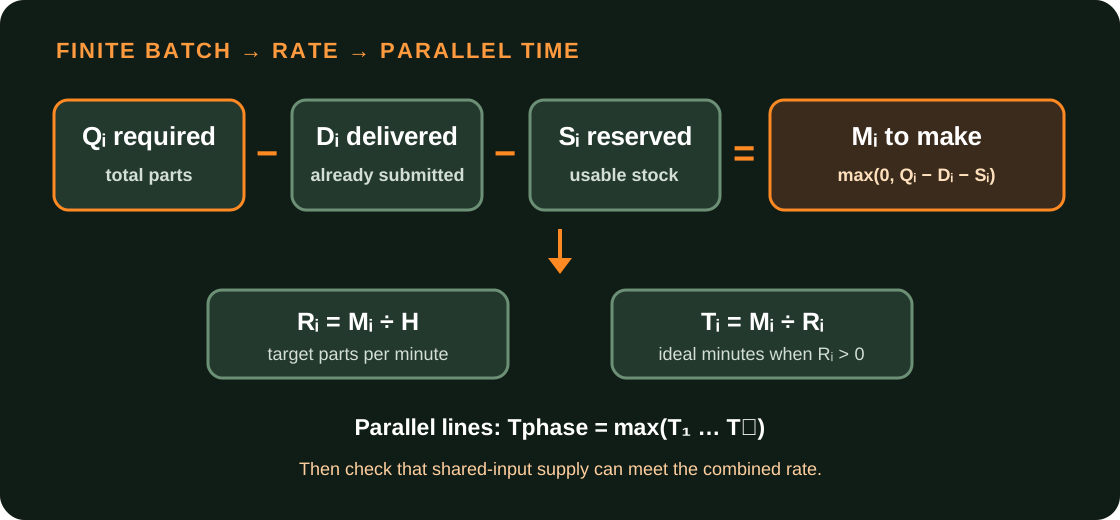
Calculate the manufacturing quantity as:
(M_i = \max(0,\ Q_i - D_i - S_i))
Count only finished parts that you have reserved for this phase and will not use elsewhere as (S_i). Do not count every item in storage as phase stock, and do not count a delivered part again as inventory. If the game does not show a remaining quantity, check the total required (Q_i) and delivered amount (D_i) in your save, then subtract allocated stock. Exact Japanese UI labels have not been verified, so this draft does not quote them.
- (Q_i): total quantity required for the current phase, in parts
- (D_i): quantity already delivered, in parts
- (S_i): completed stock set aside for the phase and available to deliver, in parts
- (M_i): quantity still to manufacture, in parts
Work backward from the time you want
If you want to manufacture (M_i) parts within (H) minutes, the phase-only target rate (R_i) is:
(R_i = M_i \div H) parts/min
Choose (H>0). If (M_i=0), no more manufacturing is needed for that target. If parts remain but (R_i=0), there is no finite completion-time estimate.
The following values are hypothetical arithmetic examples. They are not current in-game phase requirements.
For A, manufacture (300-80-40=180) parts. To make them in 30 minutes, target (180÷30=6) parts/min. For B, manufacture (180-30-60=90) parts, so the same 30-minute window requires (90÷30=3) parts/min.
Find the completion time for parallel targets
Assume the parts run on separate production lines at the same time and have enough inputs and transport capacity. In that case, do not add their times. The phase batch is ready when the slowest remaining part is ready:
(T_{phase} = \max(T_1,T_2,\ldots,T_n))
In the hypothetical example, A takes (180÷6=30) minutes and B takes (90÷3=30) minutes. If the two separate lines run concurrently, the ideal manufacturing time for the phase batch is (\max(30,30)=30) minutes, not 60.
For a positive target rate (R_i), ideal time is (T_i=M_i÷R_i). This assumes continuous production at the planned rates. Planner results do not reproduce in-game power interruptions, blocked transport, unfinished construction, or the time required to deliver the parts to the Space Elevator.
Check shared-input limits
When multiple lines use the same intermediate or raw input, add their demand and compare it with the available supply rate. For the hypothetical example, suppose A and B consume an abstract shared intermediate X at 2 and 4 units per part, respectively. These are invented arithmetic ratios, not recipes from the game.
If the supply of X is only 18 units/min, both 30-minute targets cannot be met at once. One option is to reduce both rates to 75%: A at 4.5 parts/min and B at 2.25 parts/min. Their combined input demand becomes (4.5×2+2.25×4=18) units/min. Their ideal times are (180÷4.5=40) minutes and (90÷2.25=40) minutes. With a steady supply of 18 units/min, the ideal manufacturing time for the batch is therefore 40 minutes.
Check each deadline-derived rate against shared raw materials, intermediates, and transport capacity. If the target exceeds a limit, compare a longer time window, more shared-input supply, or prioritizing one part.
- A at 6 parts/min needs (6×2=12) units of X per minute.
- B at 3 parts/min needs (3×4=12) units of X per minute.
- Together, they need 24 units of X per minute.
Keep finite stock out of Planner’s per-minute input
Subtract finite stock (S_i) from the manufacturing quantity (M_i) before calculating the phase target rate (R_i). Planner’s “External inputs” section provides an “Input rate” field for ongoing supply per minute. A warehouse count entered there does not represent a one-time stockpile.
To plan multiple phase parts together, get each (M_i) from the current in-game target and choose a time window (H). Calculate each (R_i), then set those as multiple output targets. If the same line also has to meet ongoing demand (C_i), use a combined target of (R_i+C_i) parts/min for that line. If a dedicated phase line is separate, assign (R_i) to that line and keep the ongoing demand in separate records so it is not counted twice.
After setting the targets, check resource limits and item balance for shared inputs. The existing production-planning tutorial covers adding targets and reading the Planner’s results; Clock Speed and Efficiency covers machine equivalents and clock speed. This guide adds the finite-batch decisions: deduct allocated stock, derive the target rate from a deadline, and estimate the batch time from the slowest part and any shared-input limit.